
Features
Far more than reporting.
Logspace started as the fastest way to get a straight answer about who did what. It now runs the whole loop around that answer — reports, time off, shifts, goals, reviews, and the oversight that ties them together.
Structured Reporting
Reporting that takes minutes, not meetings.
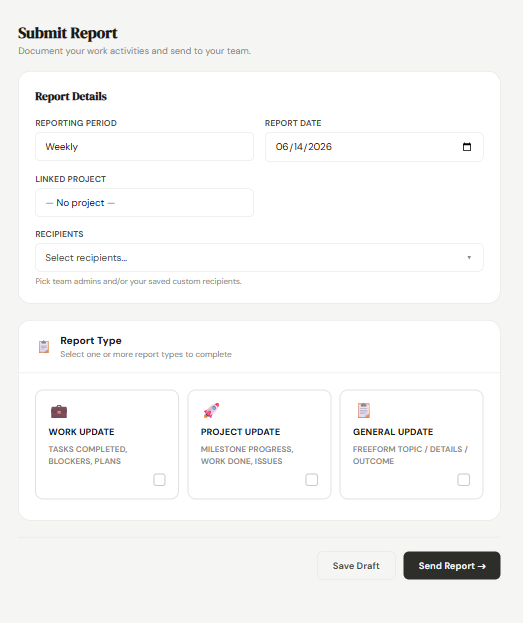
A guided form means everyone reports the same way — no blank pages, no guessing what to include, no chasing.
- Weekly, monthly, or ad-hoc reports in a consistent structure
- Multiple sections plus a headline highlight for the week
- Attach files and supporting evidence to any report
- Tag a department, project, or calendar event
- Log progress against your goals from inside the report
- Report formats built to match how your teams actually report
- Save as many drafts as you need and pick up where you left off
- Optional AI polish tidies grammar and tone before you send
Oversight & Compliance
See the whole organisation at a glance.
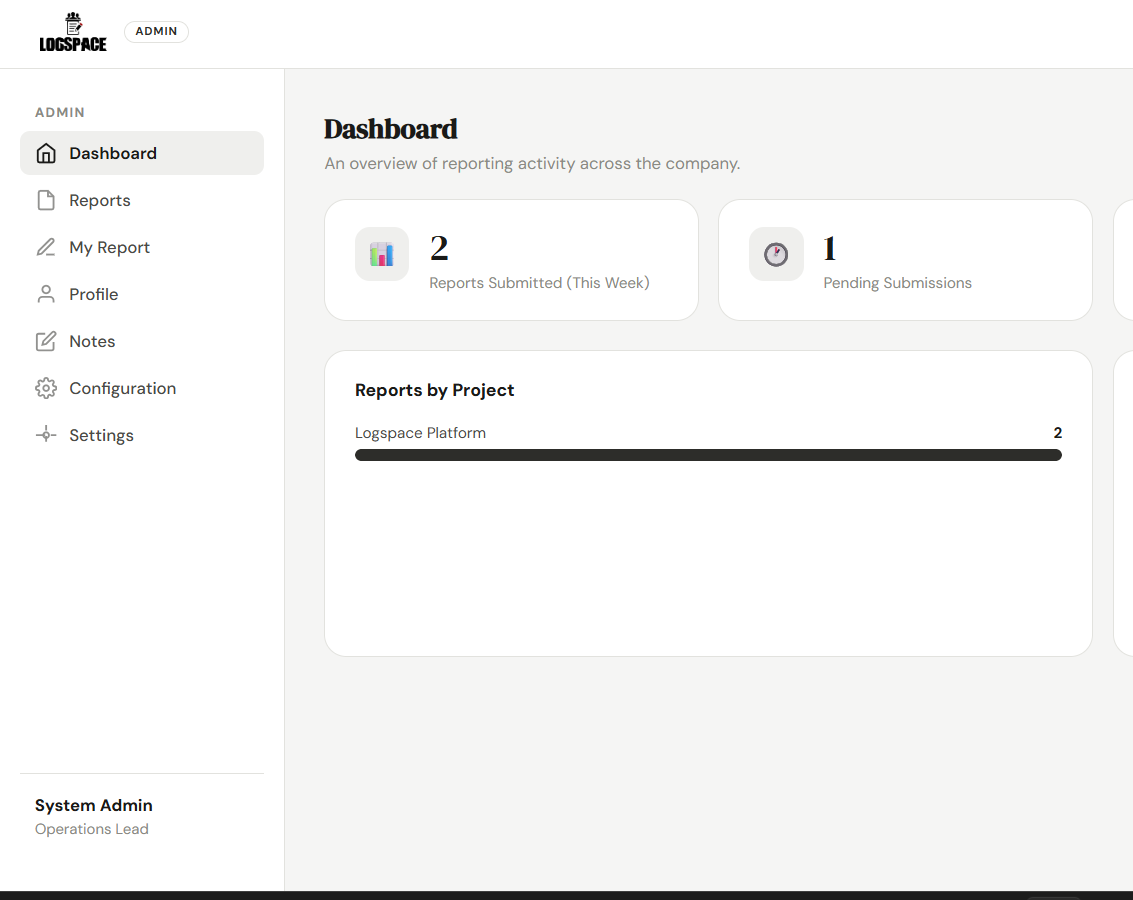
A live command centre showing what's been submitted, by whom, and what's still outstanding — across every team.
- Real-time submission tracking as reports arrive
- Compliance view of who was expected to report and who did
- People on approved leave are excluded automatically
- Analytics across departments, projects, and periods
- Organisation-wide report search and filters
- Set the reporting schedule your company actually runs on
Time & Attendance
Leave, overtime, and shifts in the same place.
The requests that used to live in WhatsApp messages and paper forms now have a proper trail — requested, reviewed, decided, recorded.
- Leave requests with types, date ranges, and half-days
- Overtime requests logged in hours, against a project
- Shift-change and swap requests between colleagues
- One approvals queue for managers, with a recorded decision
- Shift rosters with times, locations, and labels
- Leave balances tracked on every employee profile

Goals & Performance
Connect daily work to how people are measured.
Goals aren't a separate spreadsheet anymore. They're tied to the same reports your team already writes.
- Personal goals with a target, a period, and live progress
- Reports can contribute progress directly to a goal
- A KPA and KPI framework with weightings per department
- Review cycles that open, run, and close on a schedule
- Self-assessment and manager scoring, each weighted
- A calibration stage before a final score is locked in

Notes & Scratch Space
Somewhere to think before you report.
Most work isn't report-shaped when it happens. Notes give people a private place to capture it as it comes, in whatever form it takes.
- Written notes for anything not ready to be submitted
- A sketch pad for diagrams, whiteboard shots, and annotation
- A code pad with syntax highlighting and a live preview
- Send any note straight into a report, as content or an attachment
- Private to the person who wrote them — administrators included

AI Assistants
Let the assistant you already use write the first draft.
Logspace speaks MCP, the open standard for connecting AI assistants to real systems. Connect Claude — or anything else that supports it — and ask it to turn your week into a report.
- Connect from the assistant with a single address, nothing to install
- Sign in and approve on a Logspace screen — no keys to copy around
- It reads your own reports, projects, goals and contacts to match your style
- Drafts only by default: it prepares, you press send
- Permission to send is a separate, explicit choice you can withhold
- Reaches nothing else in the account, and disconnects in one click

Every module
What's inside a Logspace workspace.
All of this is active in a Logspace workspace today. Plans differ by team size and AI access, not by locking away the core product.
Guided weekly, monthly, and ad-hoc reports with sections, highlights, attachments, and drafts.
A permanent, searchable record of everything an employee has submitted.
Reports are formatted and emailed to chosen recipients on submission, with delivery status tracked.
Leave, overtime, and shift-change requests with a full approve or reject trail.
Rosters with start and end times, locations, labels, and status for every scheduled shift.
A single queue where managers action every pending request, with the decision recorded.
Targets over a period with live progress, optionally linked to a KPI and fed by reports.
Review cycles with self and manager scoring, weightings, calibration, and a final score.
A competency framework of key result areas and indicators, weighted per department.
Multiple choice, scale, and free-text questions. Target an audience, and run them anonymously if needed.
Reporting trends and team activity across departments, projects, and time periods.
Who was expected to report this period, who did, and who is outstanding — leave-aware.
Company-wide and personal events, with reports able to reference the event they relate to.
Store contracts, policies, and records with visibility controls for private, employee, or HR access.
Employment type and status, start date, work location, emergency contacts, and leave balances.
Organise people and work so reports roll up to the right place automatically.
Write, schedule, and publish company announcements, including to addresses outside the workspace.
In-app alerts when something needs attention — a decision, a review, or a new submission.
A private workspace for work in progress: written notes, a sketch pad for diagrams, and a code pad with syntax highlighting. Any of them can be sent straight into a report.
Connect Claude, or any assistant that speaks MCP, and have it draft reports from your notes. Read-and-draft by default; sending is a separate permission you grant.
An optional assist that tidies grammar and tone without changing the facts. Business and Enterprise plans.
Every action logged and timestamped, searchable, and exportable to CSV for HR or compliance.
Admins manage and oversee; team members submit and track their own work. Everyone sees what they should.
Your name, logo, and colours on your own subdomain, editable from the admin console at any time.
A database dedicated to your company, with encrypted secrets, secure sessions, and role-based access.
Not a company? Try Logspace Community.
A free personal workspace with reports, goals, projects, a calendar, and notes — plus peer-to-peer sharing through contacts you accept. No employer, no admin, no cost.